
WSB PayByCode for WooCommerce
Simpler bank transfers
Bank transfers without retyping the IBAN and payment reference.
PayByCode extends the WooCommerce payment method Direct bank transfer (BACS) with payment codes (HUB3 barcode and EPC QR), buttons for copying payment details, and reminders and automatic cancellation of unpaid orders. Codes are generated locally on your WordPress server.
HUB3 and EPC QR · Local code generation · Works with the existing BACS payment method · Annual license with updates and support
Simpler payment by bank transfer
With bank transfer payments, customers often have to enter the IBAN, recipient name, amount and payment reference by hand. Every typing mistake can delay the payment or make it harder to match to the order.
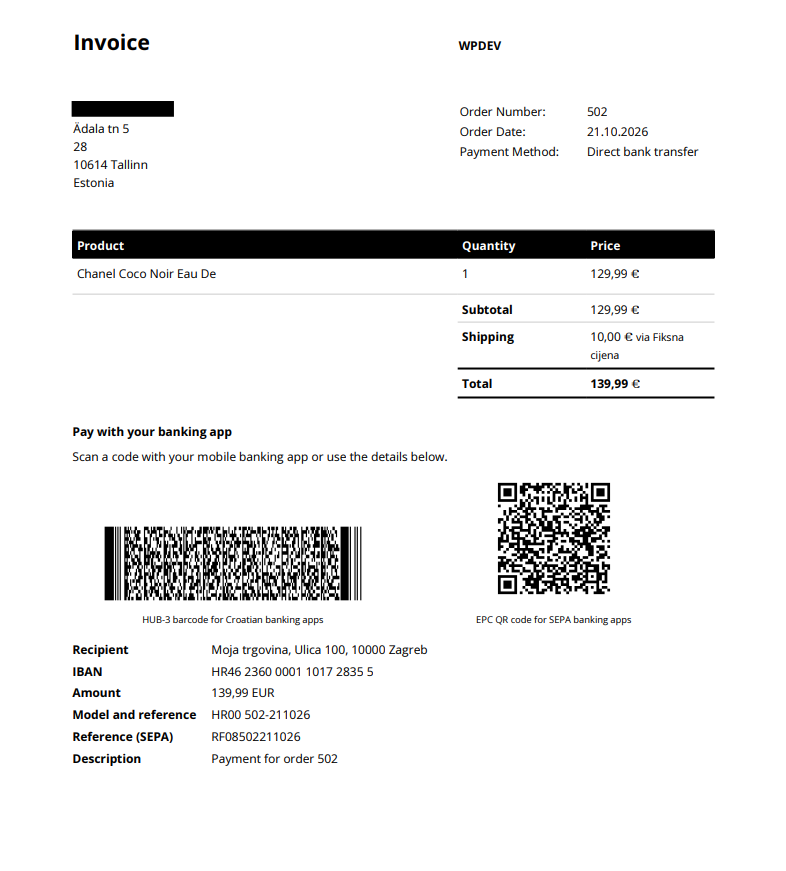
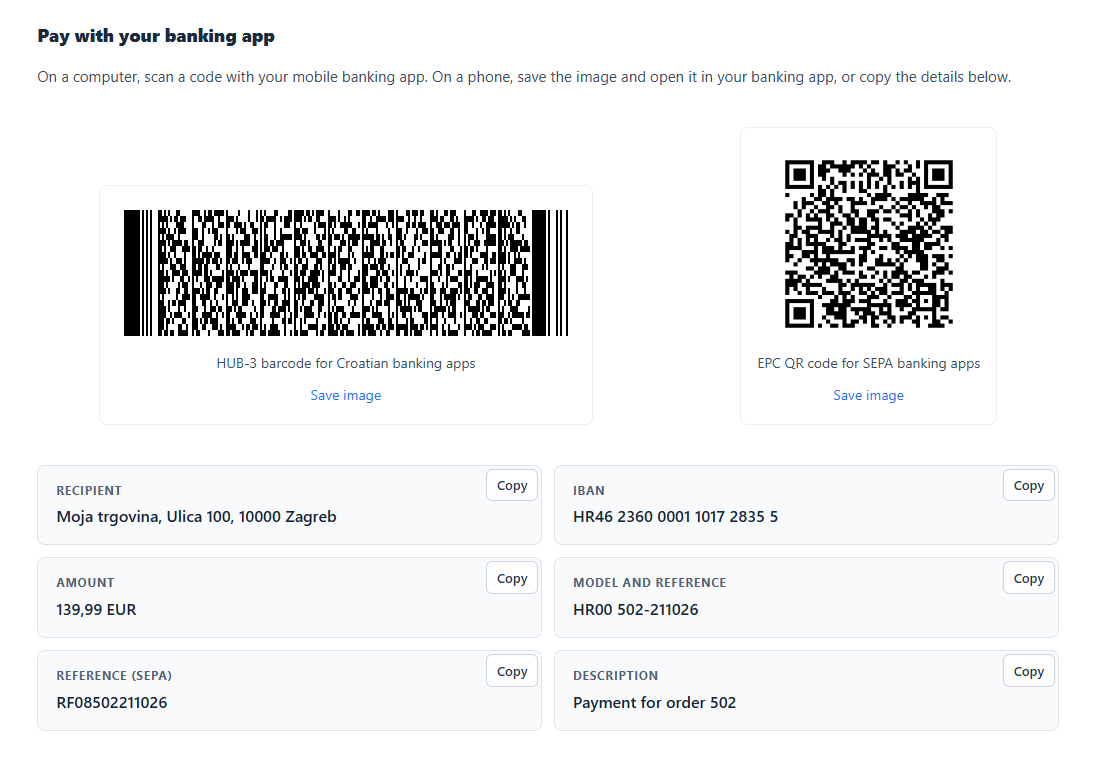
PayByCode shows the payment details both as a code and as plain text, so customers can choose what suits them best:
- scan the code with their bank’s app
- save the code image and upload it into the bank app, if the app supports it
- copy individual details with the Copy button
- enter the details manually in the bank app or online banking
PayByCode does not execute the payment or confirm that the money has been received. The customer reviews and confirms the payment order in their bank, and you keep tracking payments as usual.
Everything you need for bank transfers in WooCommerce
HUB3 and EPC QR codes
HUB3 for Croatian payments and EPC QR for SEPA credit transfers, in one plugin.
Local generation
Codes are created on your server. Order data is not sent to an external code-generation service.
One-click copying
Customers can copy the IBAN, recipient, amount and other details with the Copy button.
Multiple bank accounts
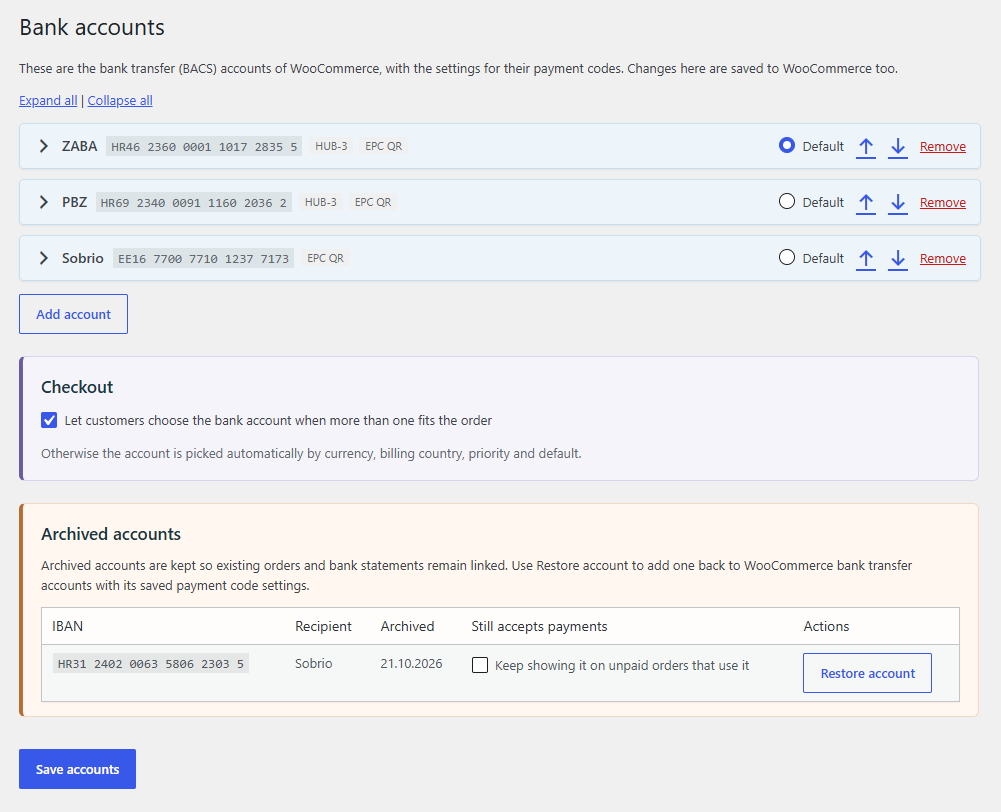
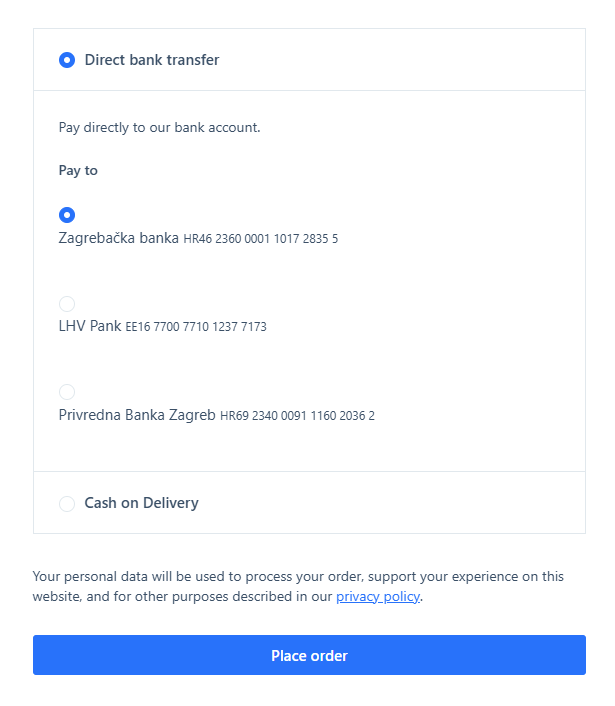
Use the accounts from your BACS settings and let customers choose the account they pay to.
Display by account and location
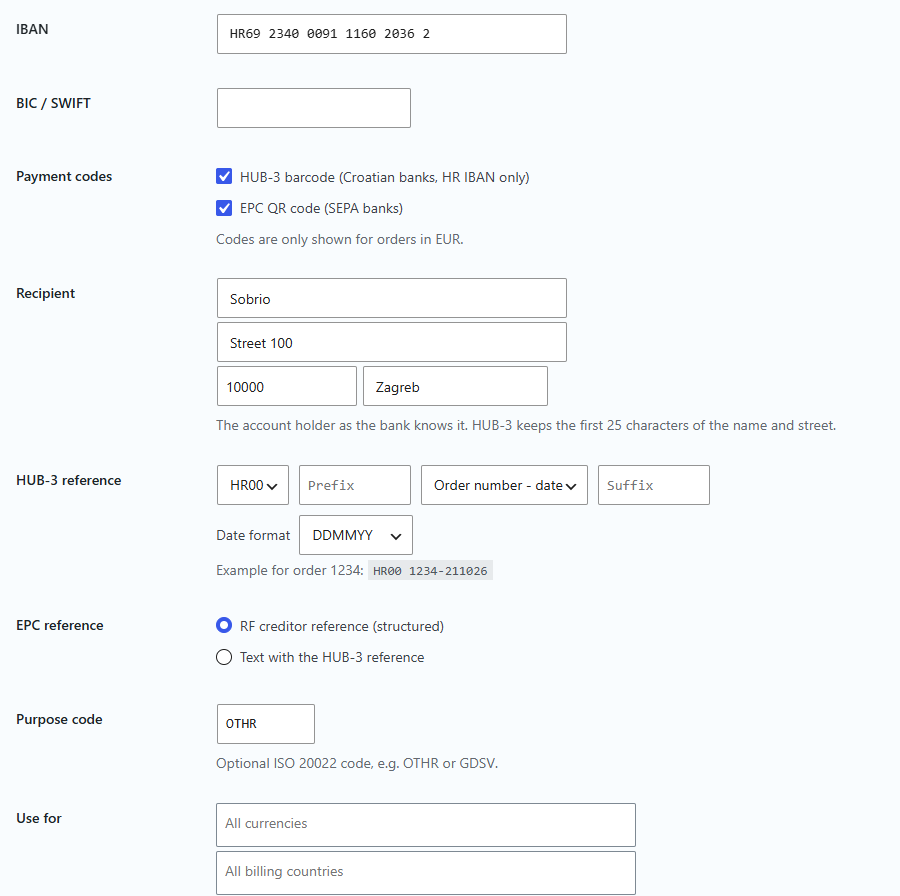
For each account, set the currency, country, which details and codes to show, and where they appear.
Fewer forgotten orders
Customer reminders and automatic cancellation of unpaid orders after the number of days you choose.
Ready to try WSB PayByCode?
You’ll find licenses, prices and current offers in our store.
HUB3 and EPC QR codes for different markets
PayByCode can display payment codes in formats designed for different markets:
HUB3 for payments in Croatia
The HUB3 code is designed for Croatian payments and can contain the details needed to fill in a payment order in a compatible bank app.
EPC QR for SEPA payments
The EPC QR code can contain the details for a SEPA credit transfer. It is useful for stores that sell to customers in several European countries, provided that the customer’s bank app supports reading this QR format.
Support for reading QR codes depends on the customer’s bank and app. That is why PayByCode also shows the payment details next to the code, which the customer can copy or enter manually.
Codes are generated on your server
PayByCode generates codes locally, on the server where your WordPress is installed. The order data needed to create a code is not sent to an external code-generation service, so you don’t add another recipient of your customers’ data.
Note: data processing still depends on your hosting, your WordPress installation, and the other plugins and services you use.
Works with your existing BACS bank accounts
PayByCode builds on the existing WooCommerce payment method Direct bank transfer (BACS). It does not introduce a separate payment method; it extends the bank transfer display with codes and additional features. It also supports WooCommerce Checkout Blocks.
This approach can help with compatibility with accounting and other services that connect to WooCommerce orders and expect the standard BACS payment method. Those services may use the payment method data to process orders, match payments or update statuses and stock. Actual compatibility depends on the individual service and its integration.
Manage multiple bank accounts
PayByCode uses the bank accounts from your BACS settings and lets you add, edit and delete them. If you have several accounts, you can let customers choose the account they want to pay to.
For each account you can set, for example:
- the currency and country the account is used for
- which payment details to show
- which codes to show
- where the display should appear
Show the details where customers need them
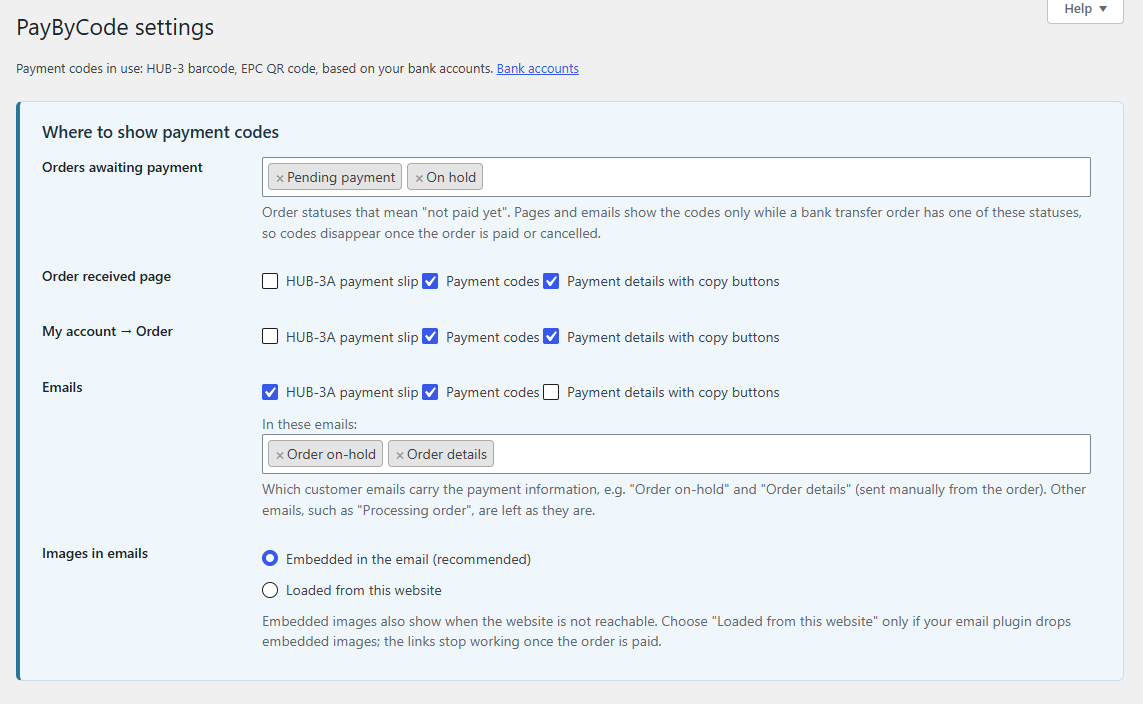
Choose where customers will see the codes and payment details:
- in order-related emails
- on the thank-you page after checkout
- in the order view in the customer account
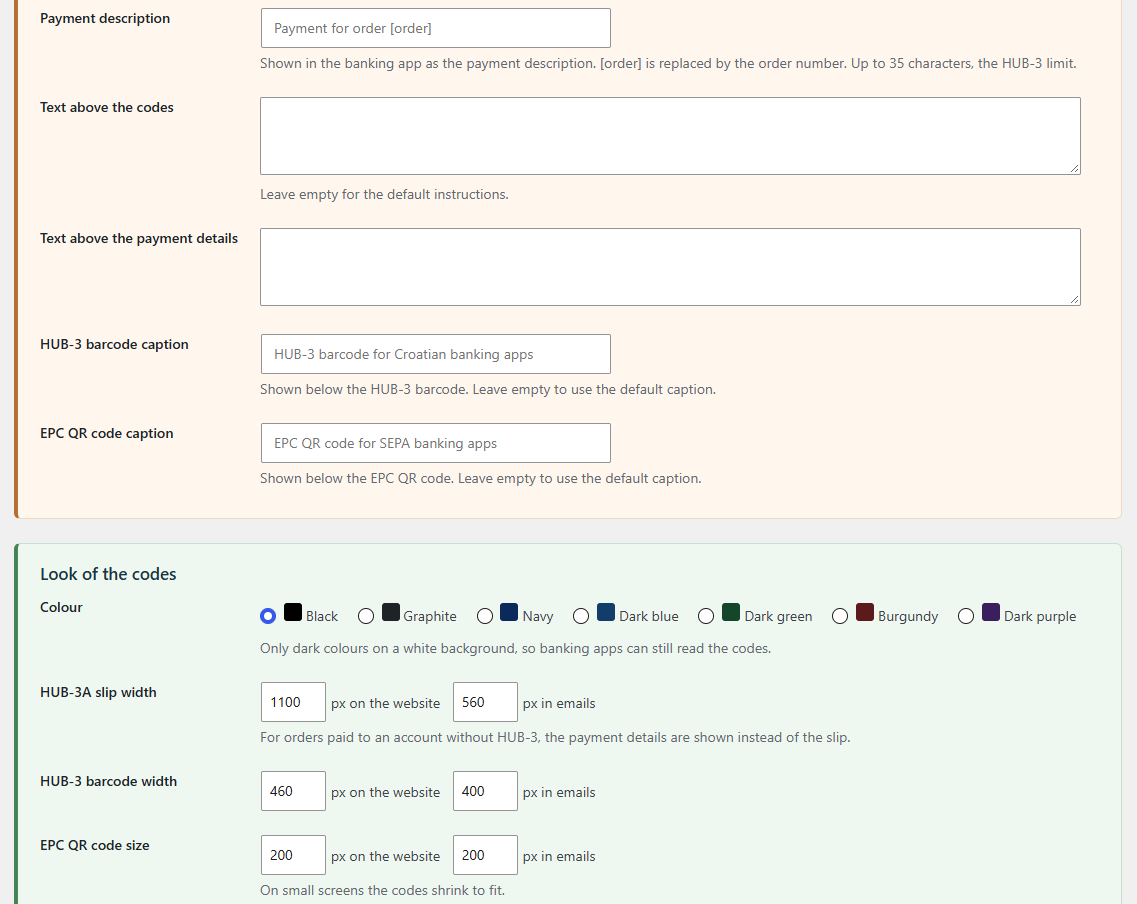
You can customize the display for each bank account separately, for example so that codes appear only in certain places, or so that plain payment details are shown alongside them.
Payment is possible even without scanning
A customer may be viewing the order on their phone and so cannot scan a code shown on the same device. In that case they can save the code image and upload it into their bank app, if the app supports it.
If the app cannot read the code, PayByCode can show individual payment details with a Copy button. The customer can copy the IBAN, the recipient’s name and address, the amount or other available details and paste them into their bank app.
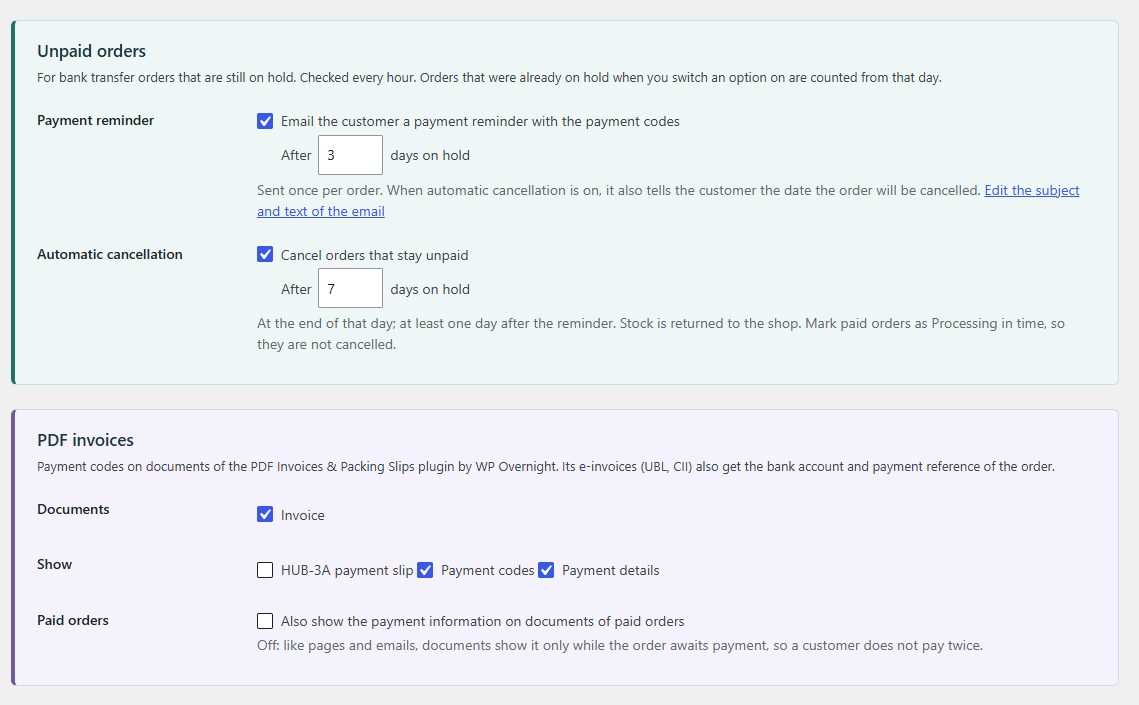
Reminders and cancellation of unpaid orders
PayByCode includes practical settings for unpaid orders:
- Customer reminder – send an email after a chosen number of days if the order has not been paid yet.
- Automatic cancellation – cancel an unpaid order after a chosen number of days.
This way you can reduce the number of forgotten orders and release reserved stock according to the rules you define.
Integration with PDF Invoices (WP Overnight)
If the PDF Invoices plugin by WP Overnight is installed on your website, PayByCode offers additional settings for how it is displayed. This way you can align the payment details with the documents you send to the customer.
Gallery
Frequently asked questions
Does the customer’s bank need to support HUB3 or EPC QR?
If the customer wants to scan the code, their bank’s app must be able to read the corresponding format. If it cannot, the customer can use the displayed payment details and enter them manually. PayByCode cannot guarantee that every bank app will support every code format.
Does displaying a code mean the order has been paid?
No. The code contains the details for preparing a payment order. The customer must confirm the order in their bank, and the merchant should verify that the payment has been received before marking the order as paid.
Is PayByCode a separate payment method?
No. PayByCode extends WooCommerce’s existing BACS payment method. This can make it easier to work with accounting and other integrations that expect a standard bank transfer, but compatibility depends on the specific plugin or service.
Does PayByCode send order data to a code-generation service?
No. PayByCode generates codes locally on the WordPress server and does not send order data to an external code-generation service. Other plugins, hosting and services on your site may process data separately.
Can customers choose between multiple bank accounts?
Yes. You can configure multiple accounts and let customers choose an account during checkout. Each account can have its own rules for currency, country and how details are displayed.
What is included in the license?
PayByCode is sold with an annual license that includes updates and support. Licenses differ in the number of websites on which you may use the plugin.
Licenses for every store and every team
PayByCode is delivered with an annual license that includes updates and support. You choose the license based on the number of websites on which you will use the plugin:
1 website
For a single store.
Up to 5 websites
For multiple stores or client projects.
Unlimited websites
For agencies and development teams.
For current prices, including the early adopter offer, see our store, where you can also buy a license.
Make bank transfer payments easier for your customers
HUB3 and EPC QR codes, one-click data copying and reminders for unpaid orders, on the existing WooCommerce BACS payment method.